
"Important News!
You can change your password for security reasons or reset your password on your Intranet account if you forget it. The account password that we gave you at the beginning is only temporary. We ask that you immediately change your personnel password on the Intranet system. Your Intranet Account Password is used to access various things including your payslip. Thank you for your cooperation. (HR, Payroll & IT support).
Anda dapat mengubah sandi karena alasan keamanan atau mereset sandi di akun Intranet jika lupa. Sandi akun yang sudah kami kasihkan diawal hanya untuk sementara. Kami mohon untuk segera menggantikan sandi personil Anda di sistem Intranet. Sandi Akun Intranet digunakan untuk mengakses berbagai hal termasuk slip gaji Anda. Terimakasih untuk kerjasamanya.The first step is go to your profile image, then click on the image and select 'Change Password'
Langkah pertama pergi ke gambar profil, lalu klik gambarnya dan pilih"Change Passsword"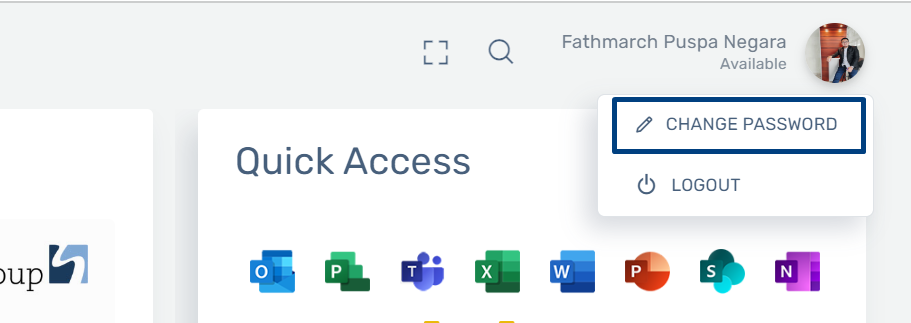
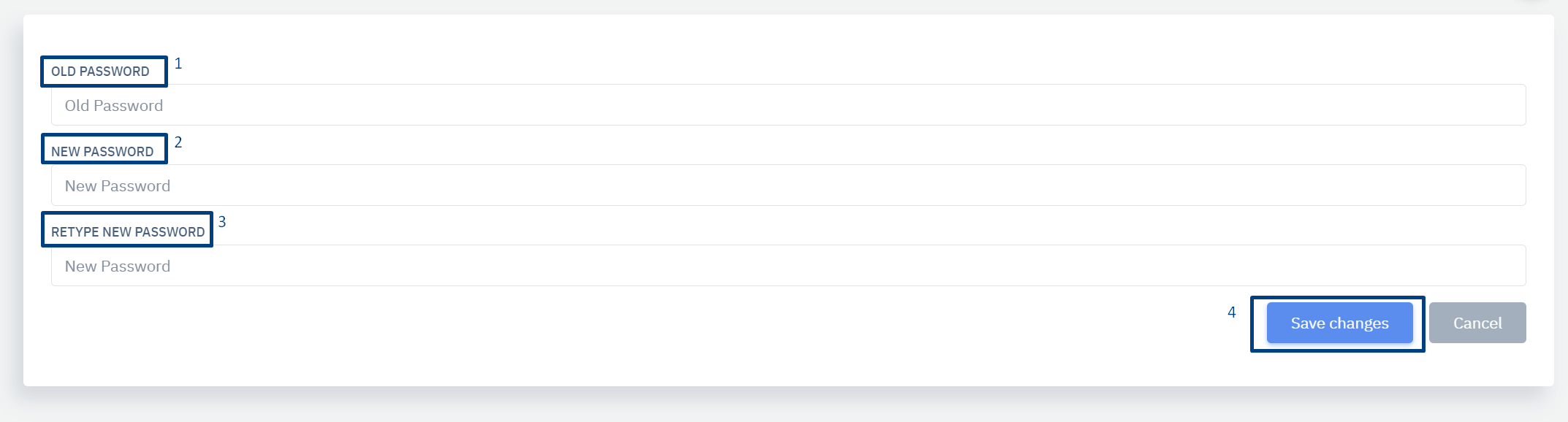
Next steps:
Langkah selanjutnya:
1. Type your old password, if it's still the default (longhi123).
Ketik password lama anda, jika masih bawaan (longhi123)
2. Type your new password.
Ketik password baru anda
3. Retype your new password.
Ketik ulang password baru anda
4. Click the 'Save Changes' button to save your new password.
Klik "Save Changes" untuk menyimpan password baru anda
Please make sure to remember your new password and avoid forgetting it. Enjoy!"
Tolong pastikan anda harus ingat dengan password baru anda dan jangan
sampai
lupa,, enjoy
"If you need help, please contact the IT Team. Thank you."
Jika anda memerlukan bantuan, silahkan hubungi tim IT, Terima kasih